@Thebigmattb-0 you can't force people to be friends with you, if it's not working out the must have their reasons
I
Posts made by ianfontinell 0
-
RE: Finding new Friendsposted in Family & Friends
-
RE: [Software Release] GayTor.rent Upload Utilityposted in Uploading
@mrsean I use W10 and it works fine. Maybe there could be a hint in the Event Log but without being able to replicate the issue it's hard to assess.
-
RE: One day you're young...posted in HIV & AIDS
@MrMazda the stigma is still the hardest pill to swallow, and it seems to be getting worse over time, I find that people seem to know little to nothing about the virus and its life cycle now, I wonder if it's not talked about in schools anymore.
-
PADDING FILES IN 2026: A STATE OF AFFAIRSposted in Non-GT.ru Technical Stuff
An analysis of how clients handle padding files in 2026, that will hopefully assist the site with its current discussion:
Padding files are not restricted to hybrid/v2 torrents:
‣ v1-only torrents can have padding metadata, as per the bittorrent's implementation back in 2016 with BEP 47.
‣ V2 and Hybrid torrents were introduced using metadata for v1-compatible clients and merkle tree for v2-compatible clients with BEP 52.
‣ Most clients without v2 support still offer the option to optimize piece alignment through BEP-47 compliant padding files.How BEP-47 compliant torrents are handled by popular clients:
PROBLEMATIC:
TRANSMISSION (Tested Buid: 4.1.1)
● Compatible with Hybrid torrents: No
● Compatible with V2 torrents: No
● Torrent Creation: v1 (no padding metadata)‣ Doesn't handle padding files.
‣ Padding files show up in the file list.
‣ They can be selected for download.
‣ If padding files exist in a seeder's PC they will be transferred.
‣ If no seeder has the padding files the download will never finish.Verdict: Impossible to finish downloading. Impossible to seed even if all content exists on disk.
WORKING REGULARLY:
UTORRENT (Tested Build: 3.5.5)
● Compatible with Hybrid torrents: Yes (Fallback to v1)
● Compatible with V2 torrents: No
● Torrent Creation: v1 (no padding metadata)‣ Padding files show up in the file list.
‣ Padding files are unchecked by default, but can be selected.
‣ When unchecked, a partfile.dat will be created to handle the padding metadata.
‣ When checked, padding files will be created in the download path.Verdict: Only torrent content is transferred/required in order to seed.
QBITTORRENT (Tested Build: 5.1.4 with Libtorrent 1.2.20)
● Compatible with Hybrid torrents: Yes (Fallback to v1)
● Compatible with V2 torrents: No
● Torrent Creation: v1 (padding metadata is optional)‣ Padding files will not appear in the file list.
‣ No padding file transferred or created on disk.Verdict: Only torrent content is transferred/required in order to seed.
QBITTORRENT (Tested Build: 5.2.0beta1 with Libtorrent 2.0.11)
● Compatible with Hybrid torrents: Yes (v1/v2 choice is peer-dependent)
● Compatible with V2 torrents: Yes
● Torrent Creation: v1/hybrid/v2 (v1 without padding/v1 with padding/hybrid/v2-only)‣ Padding files will not appear in the file list.
‣ No padding file transferred or created on disk.Verdict: Only torrent content is transferred/required in order to seed.
BITCOMET (Tested Build: 2.20)
● Compatible with Hybrid torrents: Yes (v1/v2 choice is peer-dependent)
● Compatible with V2 torrents: Yes
● Torrent Creation: Hybrid (Padding Metadata + Merkle Tree)‣ Padding files will not appear in the file list.
‣ No padding file transferred or created on disk.Verdict: Only torrent content is transferred/required in order to seed.
*Tests were conducted with v1-only and hybrid torrents created by me using qbittorrent and bitcomet.
-
RE: Austin Wolf discussion not allowed?posted in GayTorrent.ru Discussions
@chuckBKK said in Austin Wolf discussion not allowed?:
I am glad this thread has remained visible. At least here, people can state their view openly.
This is the best place (only place tbh) to discuss that, because here you can object to a rule without defying it. I have thought about this in the past, if the moderators had a way of putting a disclaimer in certain torrents to help people decide if it's for them or not.
Initially I was thinking things like, this contains some duplicate files, or poor image quality, or choppy fps... relevant info that you only get to know after the file is downloaded. If we had this feature, it could also be used to inform about other things.
Or at the very least, instead of just waiting to remove off-topic comments the moderation could use the comment section to make a brief statement, maybe that would also help de-escalating this discussion in the comment section.
-
RE: Austin Wolf discussion not allowed?posted in GayTorrent.ru Discussions
@chuckBKK said in Austin Wolf discussion not allowed?:
When my comments, and others that were not offensive, are repeatedly removed, while comments defending this content remain visible, it sends a very clear message about whose views are welcome here and whose are not.
You know that's not even true, I have defended that his content should not be banned and my comments have been removed just like everyone else's. The fact that the website chose not to ban his content is read differently by different people, you might think the site staff is lenient or outright sympathize with him, others will think that banning his stuff could be a form of censorship and punishment towards members who consume his videos.
You can think it says a lot about them, that might be true... They might sympathize with that creator, or find it totally irrelevant, or they might just not even know about any controversy at all.
I have deleted videos of various creators from my collection because of personal controversies, people who I later found out were racists, transphobes, pro Israel, rapists, etc... It is a choice that I am entitled to make but it's not up to me to decide for others. If the content itself is 100% legal people have the right to find, keep and indulge in it.
You can go to an Austin Wolf torrent and comment "just so you guys know, he's a pedophile" and for as much as what you'd just stated is a fact, it has nothing to do with the torrent content.
-
RE: Torrent did disappearposted in Uploading
@MrMazda said in Torrent did disappear:
What gives you credit in my book is that you can express this different view in a civilized and respectful manner.
If only you could see my original message lol
It's so easy to take things personally that, even being aware of this, that often isn't enough to stop me. But despite my disagreements with some rules (among some other frustrations), I absolutely love this site, and I come here every day, and I'm very appreciative of the people like you who chose to work for free just out of feeling the same way.
And just like you said, that's how we learn, and I have learned some new technical stuff about torrents along the way.
-
RE: Torrent did disappearposted in Uploading
@MrMazda I apologize for the insistence but your answer to my message regarding to padding files is outdated, I am reaching out because I think what you're doing is harming the community, even if trying to help.
What you said about padding files being tied to specific clients, and those files being actually downloaded, was the case in the past. This happened before the existence of Bittorrent v2 protocol. This protocol was first introduced only years ago in 2020. Surely padding files were a thing long before that, following what you have said: each client had their own interpretation and there was no overall compatibility between different clients.
Those torrents, despite having padding information, were not v2 or hybrid, they used Bittorrent v1 protocol (as v2 still didn't exist). V1-only torrents should never have padding information. So in this sense, if you can tell a torrent is not v2/hybrid and has those padding files, you are correct in removing them.
Bittorrent v2 is a totally different implementation, it is not any client's own interpretation but rather it is a direct implementetion right into the bittorrent protocol itself. Hybrid torrents fall back to Bittorrent v1 protocol (without padding) if the user's client isn't compatible with v2. Meaning Hybrid torrents are backwards compatible with any torrent client.
For instance, qBittorrent has 2 main versions, one using Libtorrent 1.2 and another using Libtorrent 2.0. You can make a hybrid torrent using LT 2.0 version and it will be backwards compatible with any torrent client. As a matter of fact most QT users use the regular LT 1.2 version, so the hybrid torrents will always fall back to v1 protocol for them.
Bittorrent v2 protocol has performance issues and adoption has been very slow (granted it's only 6 years old) but hybrid torrents can still be used by any torrent client. When a hybrid torrent is loaded in a v1-only client it will not use the new sha-256 hash tree for individual files, but the regular sha-1 hash tree which does not include any padding information.
When the tracker reports a size that is bigger than the size of all files, but the torrent client reports a smaller file... That is a hybrid torrent, it's not inflating any number and is not transferring any garbage file.
As for the tracker, what should happen is that, when a torrent is flagged as hybrid, it should ignore the padding files from the total size and hide them from the file list, and only delete torrents that contain padding files but are not hybrid.

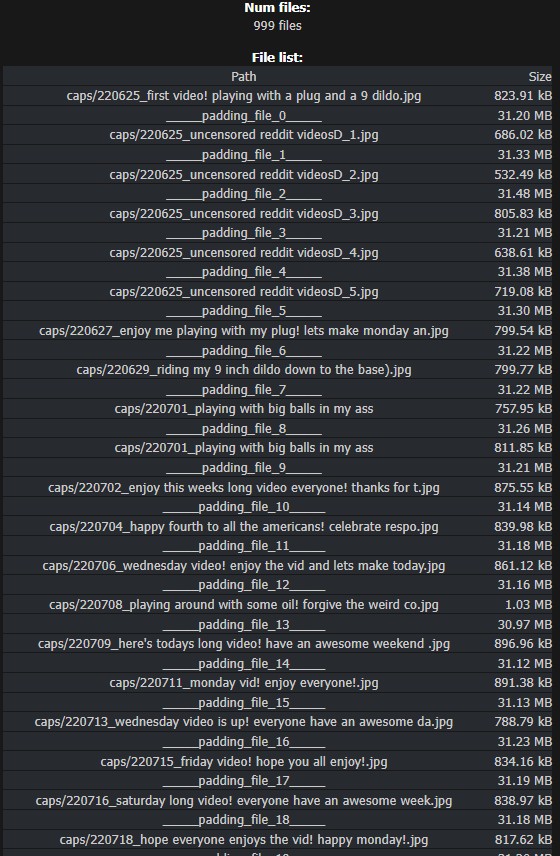
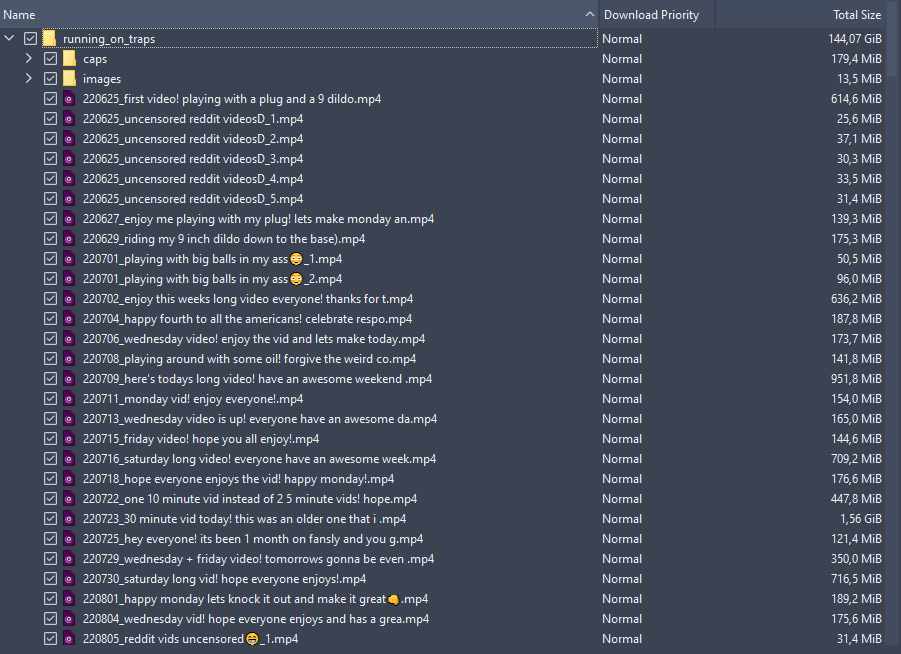
PS: I was gonna send a PM but it was too long.
-
RE: Trouble getting it up...posted in Sex & Relationships
@Chaser18 that really depends on how comfortable you feel around your therapist, because if you bring this topic to them, you need to be prepared to be confronted with some uncomfortable questions, or with the possibility that they might feel inapt to help you.
you can go to a therapist with what you think is an issue, and they might have a different understanding. they may think your issue is actually a symptom of something else that is not related to sex at all. a sex therapist is usually better with those cases as they tend to be more open minded and have more experience with this type of patients. but a generalist therapist might be a good start, specially if you are already seeing one and have a good relationship with them.
-
RE: Nothing seems to seedposted in Ratio
@Chaser18 the presence of the i flag even in other trackers is enough to rule out passive mode, everything is working fine.
PEX and DHT are always disabled in torrents from most private trackers.
As for ipv6, gaytor.rent does not have a ipv6 tracker, there's nothing you can do about it.
regarding to public vs private trackers, the biggest difference is the importance of keeping a positive ratio.
most private trackers don't allow DHT so peer discovery is limited exclusively to the private tracker. the member count in private trackers is much smaller, so obviously the total amount of people who can potentially download a torrent is much smaller as well.
in public trackers, hit and run is the norm: you download something, once it's done you stop the torrent or remove from your client, your ratio doesn't matter.
in private trackers it's the opposite, people try to stay seeding for as long as possible because if their ratio go negative they can be punished.
because of this, torrents from private trackers always tend to have more seeders than leechers consistently.
i have around 330 torrents from this tracker in my client as of now. only 1 are actively seeding, and at super slow speeds often less than 1KB. this is the reality of private trackers.
and as for a static ip, it's the worst possible idea because it drastically increases exposure to attacks and reduces your privacy, both things you want to avoid at all costs. specially if you are torrenting copyrighted materials, for you become more vulnerable to legal action from copyright owners.
if you are really obstinate about improving your ratio, it is best to invest in a seedbox.
-
RE: Time when torrent has been added is wrongposted in GayTorrent.ru Discussions
@gargoyle99 upload time displayed is not subjective to the user time zone, server time is always Central European Time, which is currently GMT +1, as frosty confirmed above if you are in the UK during winter time the site time will be 1 hour ahead. During summer UK switches to BST (UTC+1) and CET switches to UTC+2. So it's actually 1 time ahead all year long.
tl;dr: site time is always CET, how behind/ahead you will be depends on your time zone.
-
RE: Torrent did disappearposted in Uploading
@MrMazda you are confusing v2 protocol for something else that happened in the past, before v2 was developed. Some torrent clients had their own implementation of padding files but it was still the old v1 protocol, those files existed in the disk and were required for seeding. v2 protocol is not the same thing. Hybrid torrents, specially, have metadata and file tree of both v1 and v2 protocols. v1 protocol has no padding whatsoever. If you'e using a client that is not compatible with v2, it will fall back to the regular v1 torrent.
Padding files are not specific to any particular torrent client. When was the last time you experienced this issue yourself? What client were you using, and how old was the torrent distribution?
-
RE: Torrent did disappearposted in Uploading
@MrMazda said in Torrent did disappear:
@dargard-0 The torrent contained padding files, which are not allowed, as they artificially inflate the size of the torrent.
Padding files are a structural feature for hashing/alignment, they're strictly theoretical and should be excluded from size calculations and file listings.
They only exist in the metadata as zero-byte alignment entries and are never downloaded, uploaded, or stored. The total data exchanged between peers always equals the size of the real files only. Any larger “total size” you see comes from how the tracker handles the file list, not from actual network usage.
There is no ratio gain or advantage for the uploader and, if anything, it's a disadvantage.
A useful comparison with BitTorrent v1:
-
v1 (no padding): Files share pieces. If you select only some files, you are still required to transfer parts of unwanted files. This is real bandwidth usage and counts toward the user's ratio.
-
v2/hybrid (with padding): Files are aligned. You download exactly the files you select, no useless byte transfers that harm your ratio.
Take as example a 200 GB torrent with many small files. In v1, partial downloads can easily add hundreds of MB (or more) of unavoidable extra data due to piece overlap, harming the user's ratio. In v2/hybrid, the "total size" reported by the tracker can be ~%5 bigger, only because the tracker is summing up real files and padding files together, which is incorrect and doesn't reflect how the client will handle the torrent. The actual transferred data can never exceed 200 GB, and partial downloads remain exact, sparing member's ratio and bandwidth.
Only thing the site needs to do is to ignore padding files, don't count them towards the total file size and not show them in the file list.
And below, an example of a real cheating scenario that you cannot detect:
Make a torrent with hundreds or thousands of small files and use a massive piece size like 128MB. If a member tries to download one single 1MB file, they will be forced to download at least 128MB. -
-
RE: Trouble getting it up...posted in Sex & Relationships
@Chaser18 said in Trouble getting it up...:
@ianfontinell-0
I didn't know a sex therapist is a thing.It very much is, and it's quite expensive

But it seems a common enough problem because the number of people who can successfully top seems to be low. It also depends on having a partner who knows how to get you up for one... and I think I need more than one night stands and sauna sessions for this.
That's also something to consider, finding someone you trust and with whom you already have a solid bond is key for figuring those things out. Specially if you're only used to nsa and one night stands with total strangers.
It's easy to assume that one thing is simple and easy and that struggling with it indicates that there's something wrong with ourselves, when we are just trying too hard to fit a shoe that isn't ours.
-
RE: Nothing seems to seedposted in Ratio
@Chaser18 the presence of the I flag shows your port is working fine, you are able to receive incoming connections, so your client is not a passive node. The poor seeding performance you're getting is most likely caused by low demand for the torrents you're downloading. Torrents that have too many seeders and few leechers.
You need to find a balance between the things you want to download, and the things that have potential to boost your ratio. If you only download things that already have lots of seeders, your ratio will plummet fast.
Good ways to increase seeding chances:
- freshly uploaded torrents with only 1 seeder.
- torrents with few seeders that just went freeleech.
- freeleeching torrents that you already have in your client and that have few seeders.
And as a last resort, you can buy a seedbox subscription. They are designed to increase torrenting efficiency:
- You are assigned a public IP and port range
- Symmetrical gigabit speeds
- More permissive NAT/Firewall rules
- 24/7 Uptime
- Better latency
Together all those factors guarantee your torrent client is always online and reachable with no service interruption, with low latency and high speeds that are often prioritized by the bittorrent protocol.
With a seedbox you can set rules to automatically download certain torrents and automatically delete torrents after they reach a certain ratio, freeing up space for other fresh torrents with higher demand. You could run a seedbox exclusively for seed farming, and use your home computer to download what you want to keep.
-
RE: Trouble getting it up...posted in Sex & Relationships
@Chaser18 it definitely sounds like anxiety and it definitely will require more than a few affirming words over the internet to overcome, i speak from experience as I had the exact same problem.
The anxiety, as the name suggests, is a suffering by anticipation, you assume things will go bad in a very specific and deterministic way.
Things that could influence in the ineptitude to get hard are the fear/shame of having a lackluster performance that the other cannot really enjoy, fear/shame of coming too fast, fear/shame of not coming at all, shame of being seen/judged as you perform.
It is also possible that the difficulty to maintain a boner is not really the anxiety but porn addiction, if you're constantly watching porn and rarely make out with others or jerk-off without visual stimuli, you might fail to get hard when presented with a different scenario. Two hot guys fucking in front of you might not get you hard even though you know if you record and watch it alone it will.
These things are best addressed with a professional sex therapist.
-
RE: Nothing seems to seedposted in Ratio
@Chaser18 said in Nothing seems to seed:
How do I know this passive node thing is working properly?
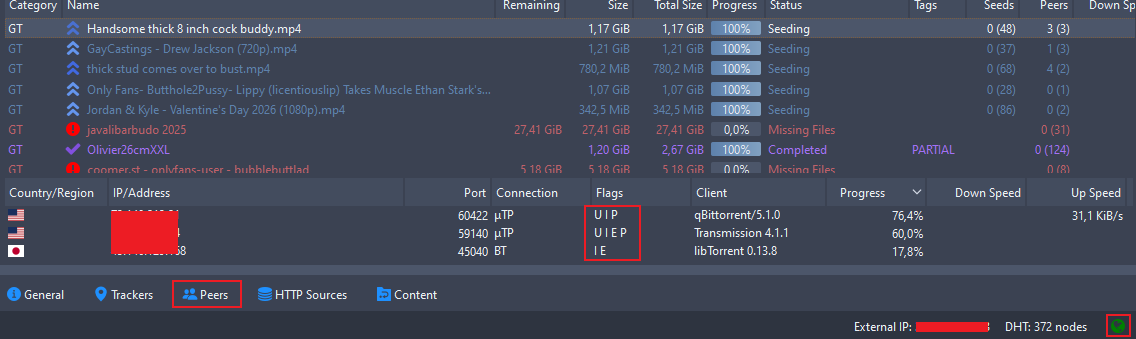
When the designated port is open and reachable, you should see the I (uppercase i) flag listed in the peer flags in active torrents. That is, torrents that are either downloading or uploading (i.e, not stalled). The I flag is more common to appear when you are seeding.
It's easier to check with popular torrents (could be from public or private tracker, as long as it has lots of leechers). If you are often actively seeding but you never see the I flag appear for any connected peer, that's a bad sign...
The complete absence of the I flag means you have port issues. You could set a port correctly in your router and client and it still not be reachable due to your ISP's infrastructure.
-
RE: [Software Release] GayTor.rent Upload Utilityposted in Uploading
@vancer while i was assisting we discovered that he had a upload restriction. i would suggest that you add a check before raising the torrent verification error message, to see if the upload really worked, for example checking if the first entry from https://www.gaytor.rent/mytorrents.php matches what was just uploaded.