Help! I didn't understand QTM at first, and now I don't know what to do.
-
In the installation interface,I didn't understand what I was supposed to do, so I just filled it in randomly.
It turns out I misunderstood uTorrent and QTM' sprogram locations
So I tried deleting the file in the QTM location I set.
As a result, after deleting and reinstalling, I found that I no longer had the installation interface.I don't know if I didn't completely delete the files, but I can't change my settings anymore.
In other words, the Torrents I upload now can no longer be seeded.
I need someone's help.
-
QTM doesn't have an installer, it's just a standalone application. I'd like to help but I'm not following exactly what happened
-
@ianfontinell-0 sorry about that.English is not my first language, so my description may be inaccurate.
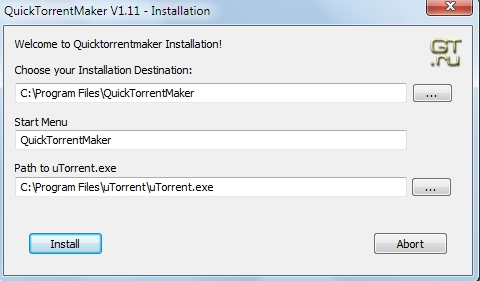
I mean this page -
@kkooj-0 The latest version of QTM is v1.14 you can download in this page: https://www.gaytor.rent/qtm.php
it finds utorrent automatically, if you have it.
-
@ianfontinell-0 I tried again.But my uTorrent file is not showing anything.
I still don't know how to seeding
I don't think he can automatically
My uTorrent version is 2.2.1. -
@kkooj-0 I tried to use QTM as well with other versions of utorrent, the upload succeeds but the file is not added to utorrent.
I tested with GUU, an alternative to QTM and it works fine, torrents are automatically added to the client after upload.
If you want to give it a try, download it here: https://community.gaytorrent.ru/topic/65942/software-release-gaytor-rent-upload-utility
After you install and run the program for the first time, you need to go to the preferences and set utorrent as your client. It also works with qbittorrent as well.
Bear in mind that if you try to upload the same file again it will fail as you have already uploaded it successfully. you can check your uploads in this page: https://www.gaytor.rent/mytorrents.php
you can delete the torrents that you just uploaded, and then re-upload.
-
Strongly recommend using qbittorrent (or nearly anything besides utorrent) and it has all the functionality you need to upload here.