I just cant upload any torrents
-
Can someone help me ? Every time I try to upload a folder our a file, the file doesn't appear in the torrent using QTM or the other new program. I tried a lot of thing a nothing seems to work. I am trying to use de upload manually but is very complex, and when i re-download the torrent it keep in a looping in 0 % of download. I really don't know what to do anymore I am very frustrating with this because i need to uploud something to keep my ratio good. Please help me
-
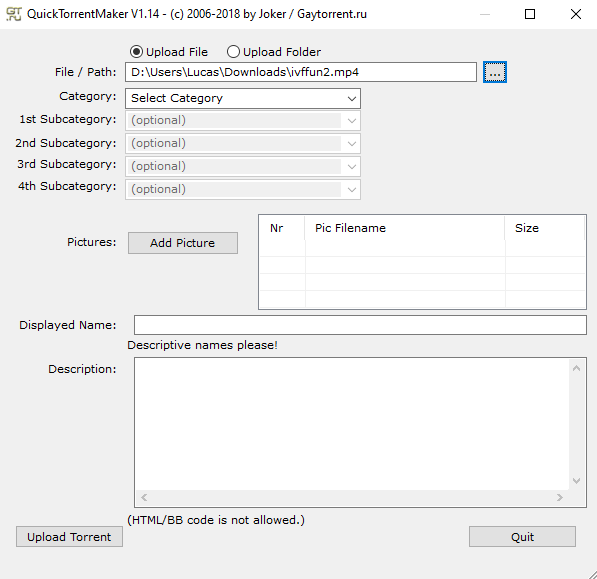
Using QTM, if you are going to upload one single file, check "upload file" and then click the three dot button, navigate to the file you will be uploading. Example:
After you have finished uploading your torrent using QTM, you will need to go here: https://www.gaytor.rent/mytorrents.php
Download the torrent you have just uploaded, add it to your client, set the download folder to where the file is located, and enable the option to skip hash check. Example:
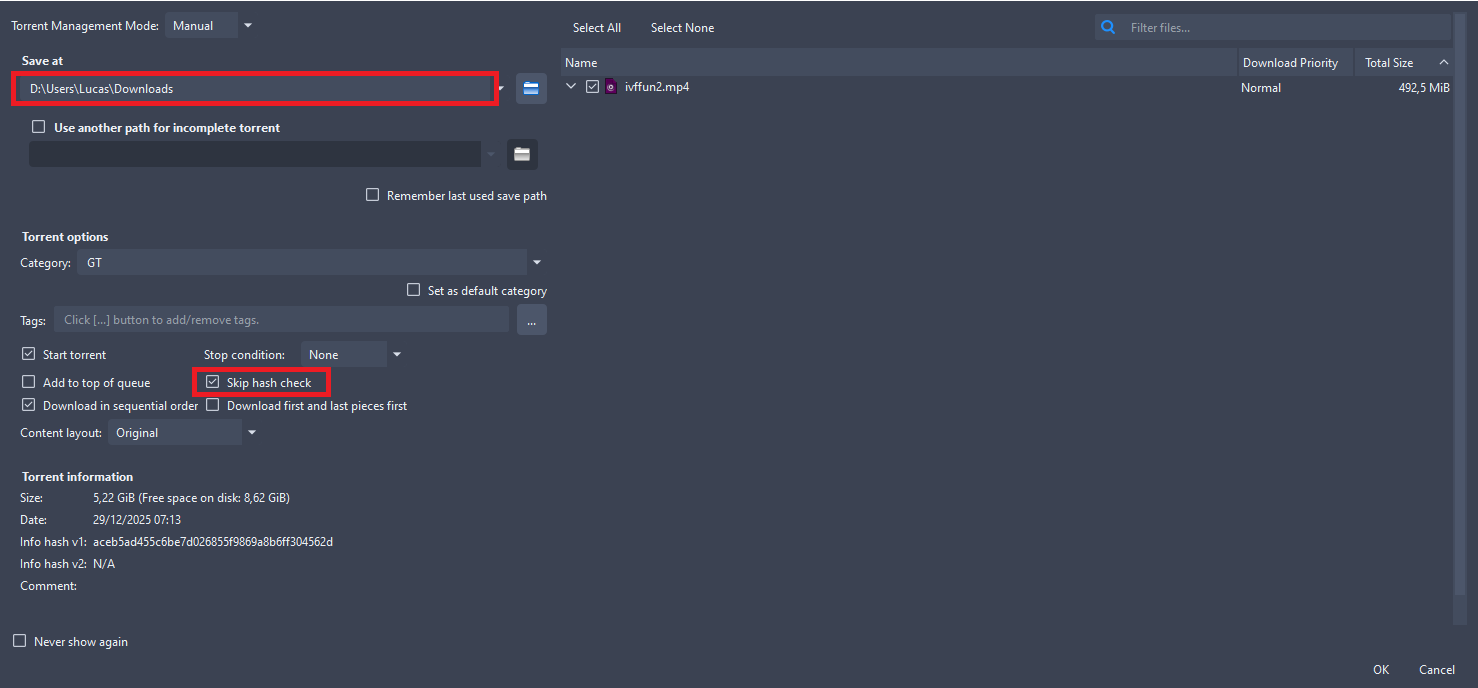
Following these steps, the torrent will start seeding immediately.
If you are using qbittorrent or utorrent, you can use GUU instead of QTM, as it allows you to add the torrents to your client automatically.If you are uploading a folder with various files, you must set the download path to **where the folder is located.
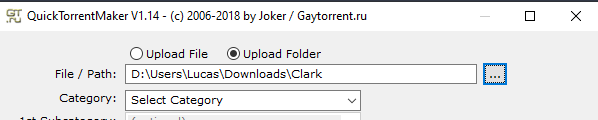
In this example I am uploading a folder named "Clark" that is located at "D:\Users\Lucas\Downloads" so inside my torrent client, when I add the torrent I created, I must set the download path to that location.
Do not set the download location to INSIDE the folder you are trying to upload, it will not work.
And don't forget, after the download is finished using QTM or GUU, if the torrent is not added automatically to your client, you must go the mytorrents.php page, download it, add to your client and set the download path correctly.
-
To put it more clearly, if you are uploading a folder, for example
"D:Users\Lucas\Downloads\Clark"you must set the download path to"D:\Users\Lucas\DownloadsIf you set the download path to
"D:\Users\Lucas\Downloads\Clarkit will never start seeding! -
@ianfontinell-0 i followed all these steps and at the end appears a "conecting to peers" and zero percent of download in loop. I dont know why it doesnt work
-
@puw17333 if the progress stays at 0% when you add the torrent, it means you are set the download path to the wrong location. i say this because, even if the torrent is not registered in the website, when you add the correct download path it will always show 100% progress because the files already exist in your machine. If it shows 0%, you are setting the download location to a different place.
What client are you using?
-
@ianfontinell-0 the old client
-
@puw17333 it worked thanks a lot, i need to check the "create a subfolder" and suddenly worked. Wow you saved me. I don't knwo why this is so difficult to do