Uploaders, if the title of your torrent is “X” and the video title is "Y"…
-
I'm not sure about the "Warned" status. I will have to look into that for you. I can say however that I had nothing to do with that part of it.
-
I was about to make my own post about this and I found yours. I couldn't agree more. :hug:
Great topic and I was wondering the same thing. Started being more active on gaytorrent.ru and noticed something that makes organizing files harder. So many times the downloaded file doesn't match the description at all. For example:
Title is: Nice cum with ass anal dildo
Filename is: xvideos.com_3fc8bb0bf51ff06fb486025ce6841c28-1.mp4I truly appreciate the uploader's efforts to provide us with such stimulating footage. My problem cums when I try to find the file.
When I look in my download directory (using utorrents 2.2.1) I have no idea what this file is.
Uploading well named files will help in seeding/keeping a torrent alive. In the above example I would rename "xvideos.com_3fc8bb0bf51ff06fb486025ce6841c28-1.mp4" to something more meaningful like: "[xvideos] nice cum with ass anal video.mp4" so I know what it is.
If I understand correctly, once a file is renamed it can't be reseeded. I want to keep files alive and healthy ratios.
Does gaytorrent.ru have file naming suggestions/ standards that include Source/Movie Name/Actors? I used your windows tool to upload my first torrent here and and it was easy and well designed. Adding suggested file naming to the instructions for uploading a torrent would help newbies and well seasoned wankers improve file naming and the quality of the database and seeding rates.
Source/Studio - Movie/Clip Name - Actor(s).mp4 is what I personally use. If we can encourage people to use meaningful file names that match the torrent description, I think everybody would be happier. Torrents would continue to be seeded and files wouldn't have to be renamed after the fact. It also helps to make sure I don't download something I already have.
This is a wonderful website and has a great community and format. The search engine and freeleech feature are very generous and well thought out.
I use Kodi/XBMC to play my files back. I don't use the catalog/library format as I haven't found out a way to organize all this stuff. Is there a gay movie scraper and file format to follow to keep our art films organized and categorized?
Thanks, Ellis, for bringing this up. This is my first forum post/reply and I hope my reply made some sense.
Please change the name of the video before you create, and upload your torrent. This isn’t a difficult thing to do.
It makes it so much easier to find your video after downloading the torrent.
Here’s one random example, out of the countless that are constantly uploaded to the site:
https://www.gaytorrent.ru/details.php?id=19d66236a69cf7d4ffef56667042f8ed512b905e3773d823
In my opinion the video is great in terms of its quality and content.
The torrent title…
“Nice cum with ass anal dildo”–and its description--also good, accurately describing the video.
The video title…
“xvideos.com_3fc8bb0bf51ff06fb486025ce6841c28-1”
WTF?!
Really, it doesn’t take much to “copy and paste” the torrent title to rename the video.
It would be most appreciated!

 fighting on the forums.
 -
Boy, hhh, for a first forum post you got your money's worth

I'll just reply to the file name part. It is a good idea to rename files to something meaningful before making a torrent to post,
However in my experience of using uTorrent you can rename files, either while saving or after download. If you want to reseed you need to point uTorrent to the file you downloaded (with its new name) and not just a folder containing it.
However the problem would then be the reverse. You would have to remember that you renamed "xvideos.com_3fc8bb0bf51ff06fb486025ce6841c28-1.mp4" of the torrent file as "much_easier_name.mp4" on your hard disk.
uTorrent checks the file data, not the file name.
-
Thank you :cheers: for the welcome and helpful response. I've tried renaming files in Utorrent 2.2.1 but maybe I am doing it wrong.
When I click a magnet or DL link, I have the file automatically start downloading so I don't get any sort of dialogue. I've been doing this for years as I don't like all the popup windows just to get a file started. Maybe something in my workflow needs to change.
I try to rename the file by right clicking on the torrent, properties, and then doing the advanced tab and either using
%F neweasierfilename.mp4 (for single file torrents) or
%D neweasierdirectoryname (for multiple file torrents)Nothing happens when I do either of those. I also rename the torrent by clicking on the torrent name in the torrent window and it allows me to change the name there, but nothing happens to the downloaded file.
I'd be most grateful to feedback.
-
hhh, I think you are trying to use uTorrent for something it's not designed for.
I like the pop-up dialogues for saving because I specify where I want the file to go BEFORE starting the download. Others like one download folder and then deal with things after. Each to his own.
You need to do the renaming in your file exploring programme. I think you would need to stop seeding while you do that. Then to restart you would need to use the Advanced/Set Download Location and point to the renamed file. And start it again.
If you restart the original torrent it will just start downloading the original file because you start automtically.
You need the save dialogue if you want to point uTorrent to the renamed file.
-
Thanks for your clear and accurate response. I am using the popup dialogue now. Also if a torrent is waiting to be downloaded and not active, I can use the advanced function to rename the file in the download directory and have it point to the original torrent.
I've learned a lot here. Will be seeding a lot more with this information, thank you! :thankyou: :surprise:
-
Good to hear all round, hhh. If you need any more help or tips just shout
-
I personally like the idea of the torrent name and file name matching, but I'd like to add something. Renaming a torrent and file just to obfuscate the title seems like a real waste. Character substitution in the title ensures your torrent will become inactive pretty fast. For example, if a person is looking for Sean Cody clips, they're not likely to search for the character substituted "S3AN C0DY" or any of the multitude of other variants.
A file uploaded with the fake name like that is going to fade into oblivion very fast.
-
A file uploaded with the fake name like that is going to fade into oblivion very fast.
I’m a fairly avid uploader and usually make it a practice of giving my torrent upload a unique title unless I’m happy with the original source title, and I always make it a point to rename the video so it has the same title as my torrent upload.
That being said, I’m going to have to disagree on your particular point, “A file uploaded with the fake name like that is going to fade into oblivion very fast.”
With 16 out the 17 uploads that I currently have on the site’s list of the 30 “most popular torrents” bearing titles I came up with, renaming has never been a problem.
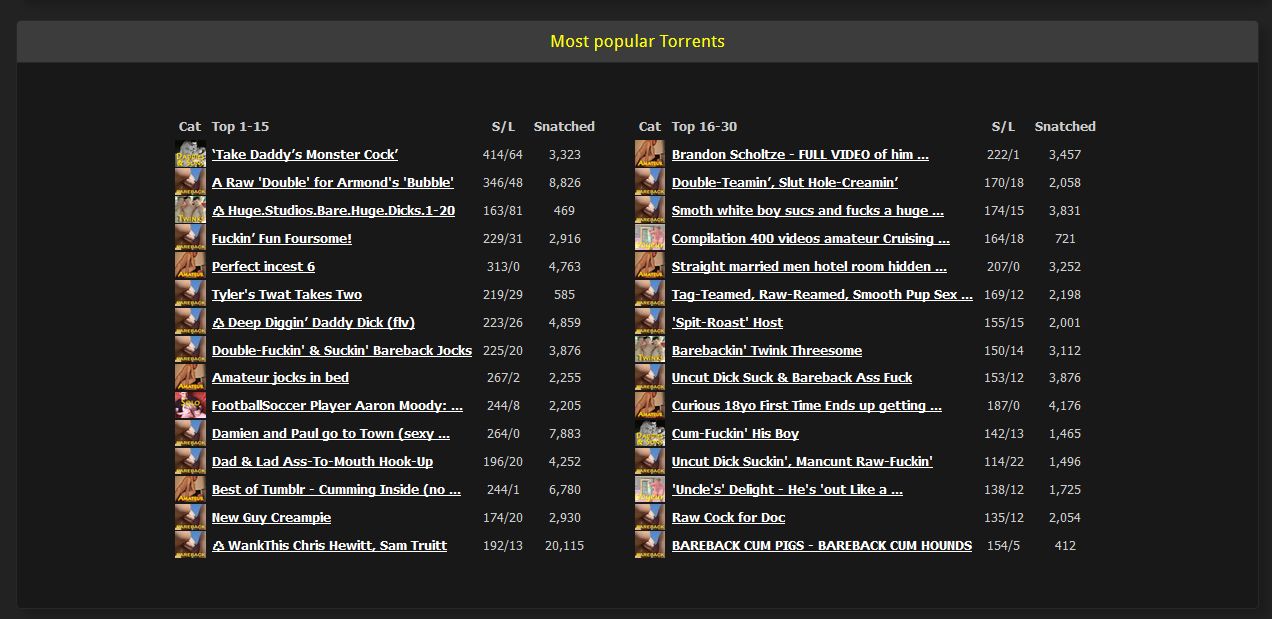
-
I don't know how you are renaming your torrents/files but I prefer something associated with the original title so I know if it's worth bothering to have a look. Or if I already have the file.
As I have downloaded none of the "most popular torrents", something isn't grabbing my attention. Probably, just me…
-
That is what I do. It requires to have opted to get that screen shown. Many downloaders (only) have opted to skip that window.
However, my beloved µTorrent 2.2.1 then only changes the name the file is saved on my storage device.
The name in the µTorrent 2.2.1 list then still remains the torrent file name (that is the name of the .torrent file created by the uploader before uploading). That is usually the file or folder name from which it was created.
Then it's still easier to know what it is, because I see that in the General tab of the details view as "Safe as:…"
That is something where newer µTorrent 3.4.x are better, because there at download you can edit the list display name at that window, too.
Thanks for the info, I was unaware of this feature. The question I have is if I do rename the file using this feature, will I still be able to seed the torrent or while I get a message from my torrent program in red "unable to find" or will it seed as normal. Thanks in advance for your help on this.
-
That is what I do. It requires to have opted to get that screen shown. Many downloaders (only) have opted to skip that window.
However, my beloved µTorrent 2.2.1 then only changes the name the file is saved on my storage device.
The name in the µTorrent 2.2.1 list then still remains the torrent file name (that is the name of the .torrent file created by the uploader before uploading). That is usually the file or folder name from which it was created.
Then it's still easier to know what it is, because I see that in the General tab of the details view as "Safe as:…"
That is something where newer µTorrent 3.4.x are better, because there at download you can edit the list display name at that window, too.
Thanks for the info, I was unaware of this feature. The question I have is if I do rename the file using this feature, will I still be able to seed the torrent or while I get a message from my torrent program in red "unable to find" or will it seed as normal. Thanks in advance for your help on this.
I also use uTorrent 2.2.1.
Mainly, this is what I do when putting together an upload. The package (aka "Directory" in uTorrent) typically consists of some images, a video, and a .torrent file:
1. Before I actually "create a new torrent' in uTorrent, I make sure the "directory" name and video title are the same.
2. In uTorrent, I select the directory, and create/save the .torrent file, giving it the same name as the directory.
3. When uploading to the site (gaytorrent.ru), I enter the same name in the "Torrent Name" field.Everything has the same name.
I'm not seeing any difficulty or problem with this procedure, yet there continues to be a constant flow of uploads with videos with these hard to identify titles which just look like a random string of letter and numbers. ???
-
Thanks for the info, I was unaware of this feature. The question I have is if I do rename the file using this feature, will I still be able to seed the torrent or while I get a message from my torrent program in red "unable to find" or will it seed as normal. Thanks in advance for your help on this.
If you rename the file (or folder for a multiple file torrent) in µTorrent's download pop-up window, before starting the download, you can still seed it after having completed the download. Same if you use the "Advanced…" options to rename or move it.
However, if you re-name the file or folder from the file explorer, you'll get a "File missing from download" error in µTorrent as it can't find the file(s) any more. This can be corrected in pointing µTorrent again to the re-named file/folder though.



Hello! It looks like you're interested in this conversation, but you don't have an account yet.
Getting fed up of having to scroll through the same posts each visit? When you register for an account, you'll always come back to exactly where you were before, and choose to be notified of new replies (either via email, or push notification). You'll also be able to save bookmarks and upvote posts to show your appreciation to other community members.
With your input, this post could be even better 💗
Register Login