Home Network Setup
-
I know that everyone's home network setup will be different, and that each person will have their own unique needs, so I'm a little curious as to what everyone has going on for their own home.
I've put a lot of time and effort into cleaning things up for my home network and phone system (yes... some of us still use an old fashioned home phone line). First, I'd like to start by showing what I started with only a few years ago when I first took over the network from my brothers.
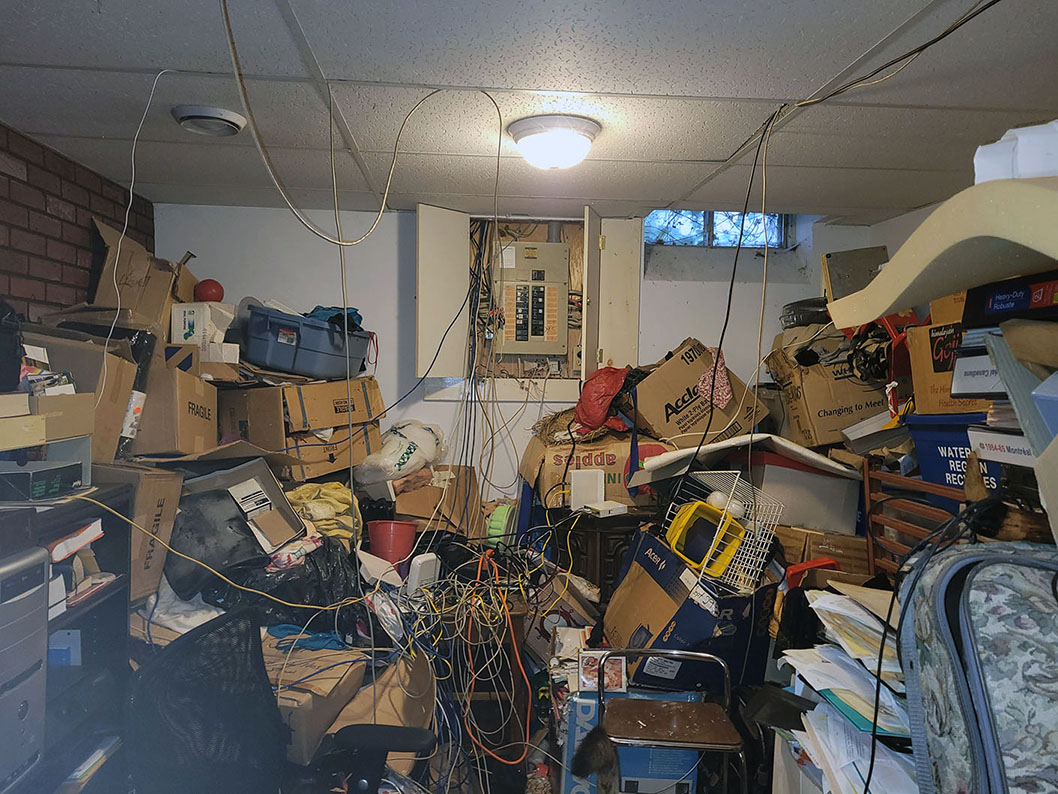
This is what I started with a few years back when I first took over the network from my oldest brother. It was a nightmare. There are actually two networks here... One for my parents' 15/10 DSL service, and one for my 1000/50 cable service. I should mention that when I first took over the network, nothing was labeled or tagged in any way, there was a lot of excess wire on every line, and everything was all tangled to rat shit, so trying to figure out what cables did what was an absolute nightmare. You'll also notice that some cables weren't even fed all the way through the ceiling to Grand Central Station, and instead, were just tucked into the edges of the tiles along the ceiling.
Now a fast forward to the latest version of what I have running in my basement as of the last round of upgrades I have done.
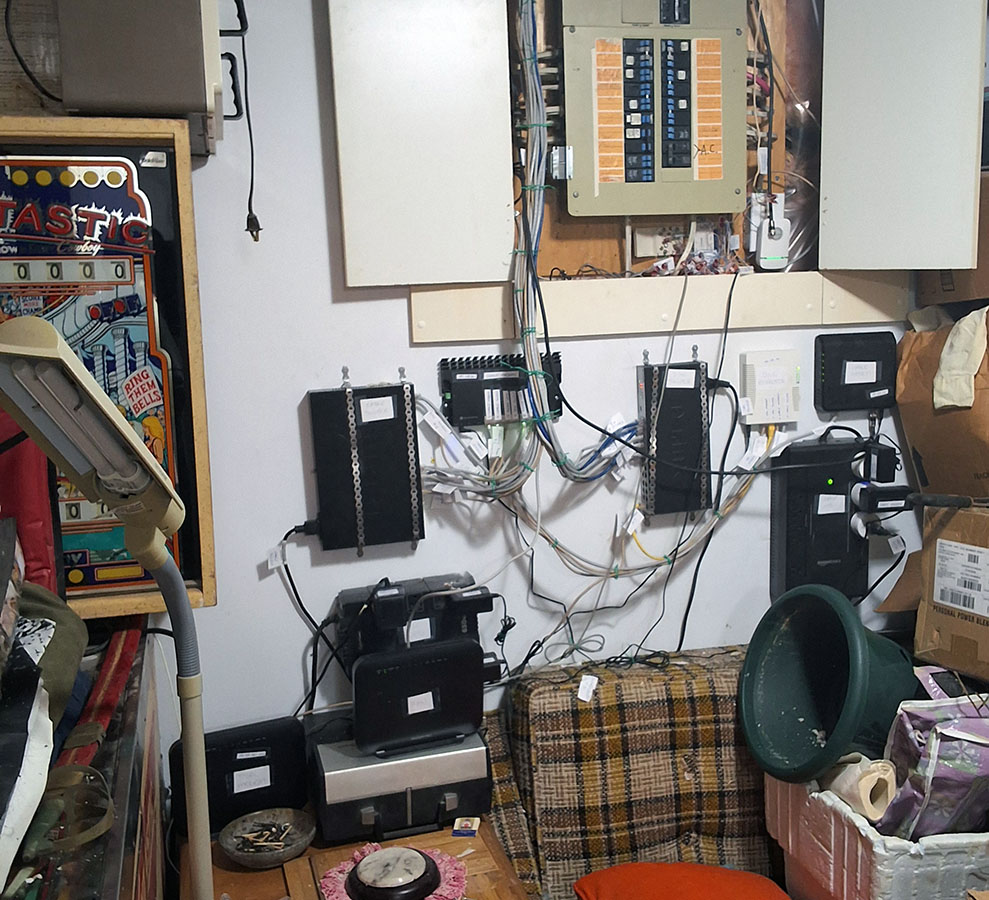
I call this point Grand Central Station. It is where the hydro (electricity) service, cable line (which only runs my internet now as there's no more cable TV since the switch to IPTV), TWO traditional Bell phone lines (one with DSL and phone, and the other with just DSL), and TWO different VoIP lines all come in and come together. As well, all the cables that come to Grand Central Station are now run all the way through the ceiling, so there's nothing sticking out anywhere.
There's also another new update since the first version. That is my brother's network, however at this point in the house, this consists only of a DSL modem and a single line run that runs from Grand Central Station to my brother's quarters. What happens with it after this point, I have no idea, but it's not my problem as he manages his own network.
So the base design here is that there are two "primary" networks in the house. There's the DSL network for my parents' 15/10 DSL service, then there's the second network for my 1000/50 cable network. When I put this together, I deliberately designed it such that if I ever move out again, all the lines and equipment from my network can be easily merged over into the main network for the rest of the house, without having to do anything too major.
The whole system for the house is setup so that every device that can be hard wired into the network is hard wired, and that each device has its own dedicated line into the network for optimal performance (especially for the WiFI), and for ease of troubleshooting so that if something goes wrong, we can narrow it down to a single line. In this new setup, every cable end is tagged (albeit with a hand written tag) indicating the room that the line runs to, as well as the jack number in that room. Every device (such as switches, UPS units, modems, and routers) are all also labeled, as are the individual ports on both the cable and DSL routers, so that it's easy to tell at a glance as to what's what, as well as what should plug in where in the event that we ever need to rip it up for some reason.
The two main networks are setup to be independent of each other, but at the same time, tied in together in two ways. First, there is a cable that joins the two routers together so that LAN traffic from one network can be sent across to the other network. This is most useful for things like the DVR portion of the IPTV. Since the Amazon Fire TV sticks that we use for the IPTV only have a limited amount of storage space, I have a hard drive attached to one of my computers on my network for DVR storage... So even if you're using the DVR on one of the devices that's on the DSL network, it can still reach the DVR storage on my side of the network.
The second is more of a redundancy setup. Each router has a port that feeds a PPPoE service into the switch for the other network so that for troubleshooting purposes, you can hop from one network to the other, or in the very occasional event that one network's internet connection goes down, with just a few clicks of the mouse, I can redirect all internet traffic through the other network, without having to change any cables or reboot anything.
That brings us to the phone lines for the house. A few years back, we ran into a problem with the phone systems on the main phone line in the house, which were causing the DSL to become unstable. When the Bell technician came, they didn't quite understand what we had going on, so when they were attempting to resolve the issue, they screwed with the wiring, making some phone jacks not work at all, and in other parts, the Bell phone line and my VoIP phone system were merged together, which made for complete chaos. This was partially due to the fact that when I first wired it, I didn't quite understand the colour coding for the phone systems, so things weren't entirely up to par in that regard.
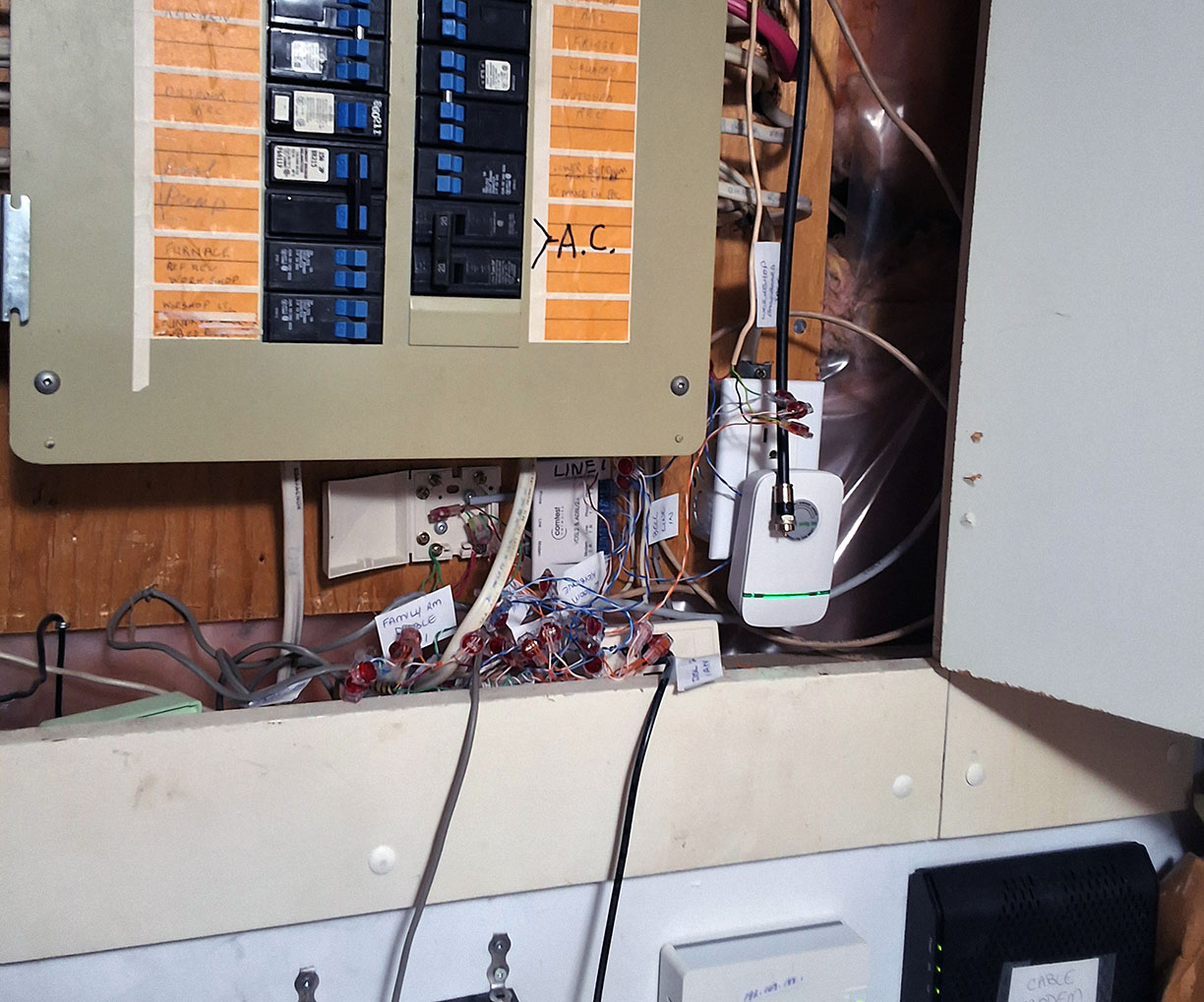
This is what we have going on for the phone lines under the breaker panel. It still looks like a hot boo boo mess (because it kind of is), but at least now, everything is technically connected in a manner that is considered to be proper, all the phone jacks everywhere work the way they're supposed to, and most importantly, all three lines (the Bell landline + the two VoIP lines) are now all properly separated by their designated colour coding.
The Bell landline (with DSL) is designated as line 1, so everything on that line connects together with Blue & Blue/White, or in the case of the old style of wiring, is connected with Red & Green. Line 1 on the VoIP service is designated as Line 2, so it's connected with Orange & Orange/White, or in the case of the old style wiring, connects on Yellow & Black. Lastly, Line 2 of the VoIP adapter is designated as Line 3, so everything on that system connects with Green & Green/White. Also, all the phone lines that run out to the different jacks have all been tagged the same way as the network indicating what jack(s) they connect to, so if we ever have to troubleshoot things, it's easy to figure out where we need to look for the problem.
The last project I've been working on is changing all the network lines to each of the devices from just a shanty cable to proper jacks, so that if we ever change things in the future, it's a lot easier to work with, as we only need to worry about plugging a cable into a jack.
That brings me to my bedroom as an example...
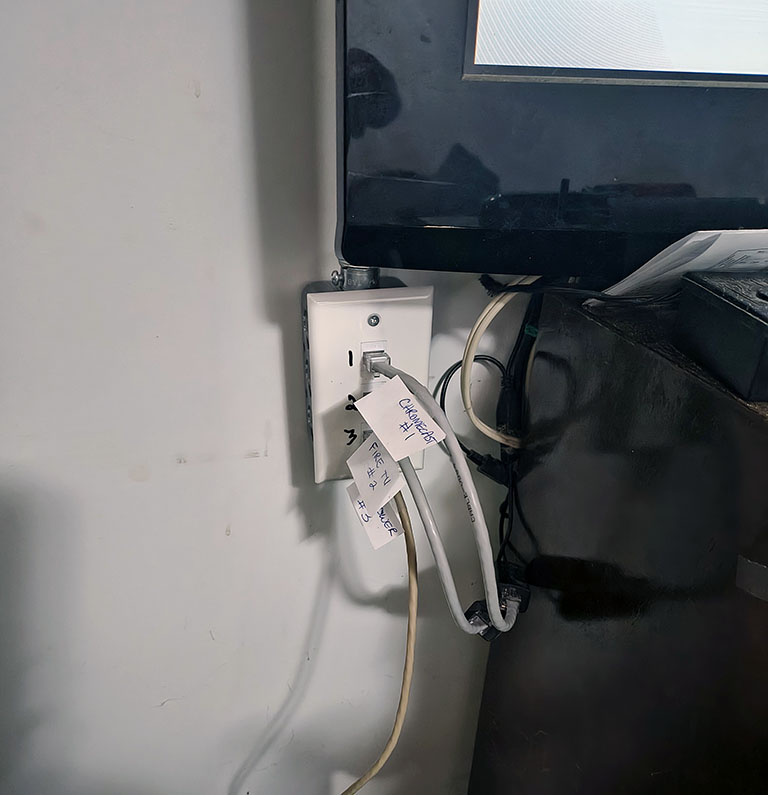
Right by my TV, there are 3 network jacks... One for each of the 3 devices that hard wires into the network over there. The jack number is marked on the face plate beside each jack, so we know which tag to look for at Grand Central Station. In this case, #1 is used for the Chromecast, #2 is used for the Amazon Fire TV Stick, and #3 is used for the PC that I refer to as the "TV Tower" because it's a desktop tower, and it connects to the TV. You'll also notice that in front of the jack, the cable that plugs into the jack has a tag on it indicating what device the cable connects to. This too was no accident.
Over by my bed, there's even more gadgets to be had...
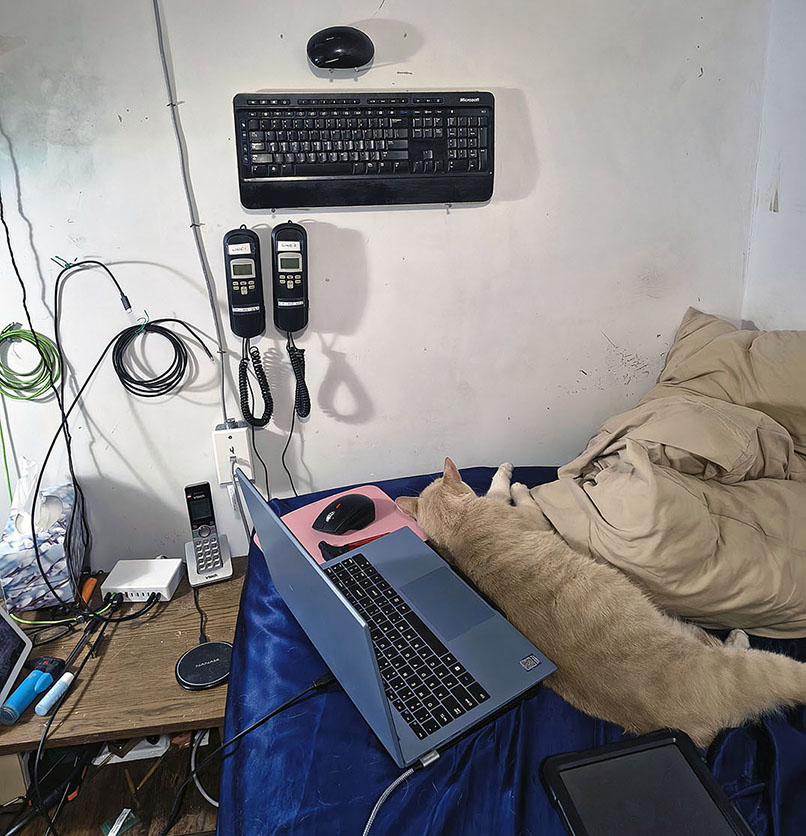
You'll notice network jack #4 on the wall beside the bed, the wireless keyboard and mouse for the TV Tower PC above the bed on the wall, and most notably, not one, but TWO hard wired emergency phones on the wall above the bed. There IS a difference between them. While they will both work in the event of a power outage, the one on the left is on "Line 1", which has access to the traditional 911 service, so it's mostly unused, while the one on the right is on "Line 2", so it gets used for most things, but does not have access to a real 911 service.
Beside the bed, you'll note that I have a USB power station for phones, tablets, and other devices, including the cooling fan I put between the bed and the laptop so the bed doesn't make the tablet overheat. There's then a docking station for my laptop, which not only supplies my laptop with power, but also connects the hard wired network, a second SD card, as well as my TV to the laptop as an additional monitor, including with sound. All wired into my laptop with a single cable so that if I ever take my laptop somewhere while traveling, I only need to disconnect ONE cable, and the laptop is good to go. I have separate power/charging gear for my laptop, phone, etc. for when I'm traveling or going to the backyard with them, so it's more convenient for me.
As for the cat, his name is Sammy, and he loves to just cuddle. He's practically furniture around my bedroom. He's so vicious that he just might climb on top of you, lay down, start purring, and demand that you pet him. Once he settles in, he'll usually rest between me and the laptop so that in order to use my laptop, I must touch him. He's a big cuddle bunny.
Also on the table beside the bed, you'll notice a Google Nest Display (partially out of the frame), and a wireless charge pad for my phone, so I need only set my phone on the pad at night to charge. The cordless phone is on the same VoIP line as the Line 2 phone on the wall. You'll also notice that unused cables are attached to the wall. This is no accident. This is because my bedroom is in the basement of an old house that was built on what was once swamp land, so every now and then, the floor of my bedroom will flood. Anything important like electronics, laundry baskets, etc are not directly on the floor, but rather, sit on bricks so that when my bedroom floods the odd time that it does flood, nothing will get damaged, and I don't run a risk of electrocuting myself by stepping into the puddle without knowing that it's there.
Ever seen a home network setup this elaborate, yet at the same time, convenient? What do you guys run? Anything this complex?